Remote control pairing info
Refreshing the connection between your remote and Gemini device fixes many common problems. First, unpair your remote from the device:
- Press and hold the DASH (–) and APPS buttons until you see the LED lights on the remote blink blue twice.
- Restart your Gemini device by pressing and releasing the red button on the side of the device. You can also unplug your device and then plug it back in.
When your Gemini device is back on, pair the remote again:
- Point the remote at your Gemini device.
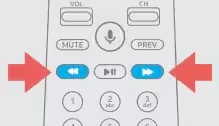
- Press and hold FAST FORWARD and REWIND at the same time for 2-3 seconds. When paired, you get an on-screen message that your remote is ready to use.
Was this article helpful?
That’s Great!
Thank you for your feedback
Sorry! We couldn't be helpful
Thank you for your feedback
Feedback sent
We appreciate your effort and will try to fix the article